

Blog
Last modified by DOaaS Operator on 2025/11/19 16:02
Jan 30 2025
Jan 30, 2025,
DevOps Portal 1.8.2
This version was only released for customers of the Competitive Toolchain due to Gitea and XWiki improvements.
Enhancements
- Gitea is now also supported for issue-tracking and agile boards. Therefore, a new tile has been added to the home page of the DevOps Portal.
- A new tile has also been added for XWiki, which links to the sub wiki, which represents the current project in XWiki.
Improvements
- Potentially dangerous permissions granted inside XWiki sub wikis have been removed from roles maintained by DevOps Portal.
- Creating a new project in XWiki can take several minutes since all themes and extensions have to be installed into the new sub wiki. The auto provisioning code has been improved to avoid any problems with such long-running tasks.
- USER_SETTINGS_CHANGE events will no longer be recorded in the audit log, since they just talk about unimportant changes like last selected project of the current user etc.
- The max length of recorded audit log entries has been extended to also show very long messages.
Bugfixes
- The processing of an unexpected AI Engineer response has been adapted to avoid possible pending syncs when resyncing a project.
- Changing the color of page titles from black to magenta was not working in all possible cases.
Jan 22 2025
Jan 22, 2025,
DevOps Portal 1.8.1
Improvements
- The database for the DevOps Portal has been upgraded from PostgreSQL v12 to v14 for all instances.
- The new RestAPI has been enabled for more pilot customers.
Jan 16 2025
Jan 16, 2025,
DevOps Portal 1.8.0
Enhancements
- XWiki is now fully supported concerning auto provisioning in the DevOps Portal. This allows customers to use XWiki as an alternative to Confluence.
- The tools Confluence and AI Operator have now been automatically connected in all projects which use both tools. This consumes one Confluence license per project, but allows all project members to ask questions about the Confluence content in AI Operator. Therefore, a very secure solution for adding AI power to your knowledge base has been added to DevOps-as-a-Service.
- The user selection box on the projects page has been replaced by a new solution which includes a search functionality. This helps a lot, finding the correct user, esp. for instances with thousands of users. In addition, the Projects page loads now a lot faster.
- The ApacheDS LDAP server has been completely removed, as all functionality was transferred to Keycloak. All users had to update their password to transfer it from ApacheDS to Keycloak. Users which have not yet set their password can at any time use the Forgotten Password function to do so.
Improvements
- Gitea license calculation has been updated to correctly reflect implicitly created tech users for pushing and pulling.
Bugfixes
- On the Users page the width of the columns is no longer changing when scrolling through the list
Dec 19 2024
Dec 19, 2024,
DevOps Portal 1.7.5
Enhancements
- Code has been added which will be later used by the Jenkins Shared Library to allow even better integration of SonarQube within DevOps-as-a-Service. The first planned feature is the possibility to automatically connect Bitbucket git repositories with SonarQube results. This will enable the Pull-request decoration in Bitbucket which is supported by SonarQube instances with Developer or Enterprise licenses. The second planned feature will allow the delivery pipeline to set the desired quality gate for the git repository.
- A new RestAPI v2 has been added for pilot customers, which can be used to automate actions in the DevOps Portal. The API will be released for all customers when all important calls have been added.
Improvements
- For larger customers with possibly hundreds of projects, DevOps Portal will now configure longer intervals for the Bitbucket organization folders in Jenkins. This will ensure that the load on the Jenkins controller is not getting too high due to continuously checking for new git repositories on Bitbucket.
Bugfixes
- When the user changes the project on the Home page, some links in the tiles have to be updated. When the new link was arriving too slow, it could happen that a link was still pointing to the previously selected project. This has been changed, so that the link will be a general one until the new project information has been retrieved.
- The selection box for the current project on the Home page was not properly losing focus when a new project had been selected. This led to the problem that the first click on one of the links was swallowed. This is fixed now.
- The portal role of a user was not properly displayed on the user details page, if the logged-in user was not a Portal Admin.
- When an organization was created containing some specific special characters, it could happen that the success message was not properly readable.
Nov 28 2024
Nov 28, 2024,
DevOps Portal 1.7.4
Preparation of LDAP-Server removal
- All users will need to set new passwords following a communicated wave planning. Automated mails are sent out as usual in the following weeks, so that every user is notified about the expiration date of his/her current password. When the users set new passwords, they will be stored in Keycloak instead of the LDAP server.
- Any technical user or token will continue to work for authentication.
- The symbols '!' or '?' are no longer displayed next to the user status to symbolize a status like e.g. locked in LDAP server.
- LDAP is no longer listed on the Health Checks page for Portal Admins.
- The documentation page DevOps Portal for Users has been updated to describe the new activation and password change workflows.
Enhancements
- Developed automated end-to-end tests for Harbor and its user interface.
Improvements
- Improved layout and content of invitation emails and activation workflow.
Nov 14 2024
Nov 14, 2024,
DevOps Portal 1.7.3
Enhancements
- When a user is created or edited, a new global role on Jenkins can be granted or removed.
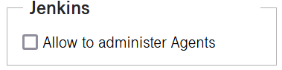
When the box is checked, the user is added to the agent-admin role in Jenkins. This role can be used to add and remove agents to the Jenkins controller. Existing agents can be connected and disconnected. Please note, that the permission for configuring agents is not included in the role. Therefore, if you want to reconfigure one of your self-hosted agents, simple remove the agent and add it again with the new configuration. For more information, see Connecting Inbound Jenkins Agents. - To be able to remove the LDAP-Server from the toolchain, several changes have been implemented:
- Tools which require an LDAP-Server are now using our self-developed LDAP-Adapter, which simulates an LDAP-Server with Keycloak as the real backend.
- The password change was moved from the Portal to Keycloak.
- Activating a user by clicking on the link in the mail is still managed by the Portal, but setting the initial password is now done in Keycloak.
- Automated testing can now also test workflows which include the sending and reception of emails.
Improvements
- Made sure that the DevOps Portal can handle a large amount of data returned by API calls of Gitea.
- The invitation email for new users is now both written in English and German language.
- When a portal or project admin calls resync on a project, this action is now recorded in the audit log.
- Reduced number of backend calls on the Portal homepage.
- Simplified configuration of Jira schemes solely based on scheme names.
- Spring Boot update
Bugfixes
- For customers who use Gitea also for source code management, the additional Gitea tile is now properly displayed before the CI/CD tile and not next to the Artifact Repository tile.
- When a reversed sort order was used for the project role column on the users page, it was not correctly memorized for later visits of the same page.
- A bug prevented the complete deletion of old scan results in SonarQube when the project was deleted in the Portal.
- If a user logs in to Harbor without having the tool assigned, it works, but of course no projects are visible. When Harbor is later assigned to the user and the user logs in to Harbor, an error occurs due to an inconsistency of the user id. This is now prevented by deleting wrong user ids in Harbor, when the tool is assigned to a user.
Sep 26 2024
Sep 26, 2024,
DevOps Portal 1.7.2
Enhancements
- When a project is created in the Portal, it's now possible in the section for Jira settings to select customized, centrally managed Issue Type Screen Schemes. If "Default" is used, a new Issue Type Screen Scheme will be automatically created just like before. See example screenshot below.
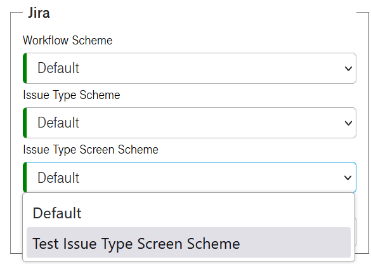
To develop new schemes and have them added to the list, please contact our service desk. - The links in the Harbor tile of the Home page are now directly leading to the projects inside Harbor
Improvements
- The selection of the date range on the Audits page is now adapted to the chosen locale of the user (the browser language). In addition, the date selection is limited to the retention time of the audit log which is 90 days.
- When a Tech User is locked, all roles of the user are automatically removed inside the tools. When the user is unlocked, the roles are assigned again to the Tech User.
- Made sure that the DevOps Portal can handle a large amount of data returned by API calls of Gitlab and YouTrack.
- Drastically reduced technical debts in the code of the frontend and backend components of the DevOps Portal.
- Error messages for pending syncs have been improved.
Bugfixes
- In some cases, it could happen on the Users page that the column header indicated a sorting, but actually the sorting was not applied.
- Resyncing projects will no longer try to resend roles for locked Tech Users.
- Due to a problem related to the upcoming removal of the LDAP-Server changing a user's organization lead to pending syncs.
- Some special characters in organization names could lead to pending syncs.
- Removed a duplicate message that could appear when unlocking a user.
- Due to changed role management in Jenkins, it could happen that Jenkins roles were not properly set-up on project creation. Saving the project again solved the problem, but now the initial role set-up is working again.
- The tooltip for the Edit Details checkbox on the Project details pages was not correct and has been fixed.
- Sorting pending syncs by the last attempt time stamp did not work.
Aug 15 2024
Aug 15, 2024,
DevOps Portal 1.7.1
Enhancements
- When a project is created in the Portal, it's now possible in the section for Jira settings to select customized, centrally managed Issue Type Schemes. If "Default" is used, a new Issue Type Scheme will be automatically created just like before. See example screenshot below.
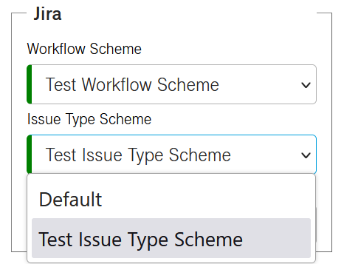
To develop new schemes and have them added to the list, please contact our service desk. - When thousands of users were managed using Firefox, the sorting by column was too slow. Other browsers like Chrome or Edge were not affected. Therefore, the technology that is used to render the Users page was changed to a solution that works superfast with all browsers. This results in an additional internal scrollbar for the User page which is not visible on other pages with long lists, like e.g. the Projects page.
- The dashboard of the DevOps Portal is now also available in German language.
- In addition, two new links have been added. Project Calendars can be found in the Confluence tile and HTTP Access Tokens in the Bitbucket tile. See Create HTTP Access Token for git usage for more information.
Improvements
- A whitelist for allowed characters in organization names was introduced to avoid problems during further processing. International letters and a variety of special characters can still be used.
- A tool tip now shows how long you have to wait until you can delete a locked technical user.
- Uploaded terms and conditions can now be sorted by file type or file size.
- Processed all potential bugs and security concerns found by SonarQube in Python code. This was now possible due to v3.0 of the Jenkins Shared Library, see https://prd.sdc.t-systems.net/bitbucket/projects/DEVOPSAAS/repos/sdcloud-caas-jenkins-libs/browse for more information.
- The role management for Rancher has been changed to allow Rancher to work without an LDAP-Server in the future.
- Code has been adapted to changed role management in Jenkins.
- The database has been updated to the latest version.
Bugfixes
- Creating new technical users for Jira Service Management was broken since DevOps Portal 1.6.1.
- Changing roles for a locked technical user could lead to pending syncs. It had no negative impact, but is fixed now. In general, all roles of a technical user which are visible in the DevOps Portal are automatically restored when the user is unlocked.
- Deleting a user could lead to a pending sync related to Harbor auto-provisioning. This is fixed now. Users were already successfully deleted, so this had not severe impact.
- Due to a security policy change, the open button for terms and conditions (which can be used to preview the local PDF before doing the upload) was not working. Now works again.
- For new users, it could happen when they used the Manage Roles function on a user, that this user wasn't selected in the combobox on the Projects page. This has been fixed.
- When a lot of scan results were present for a project in SonarQube not all of them were deleted. Still, the results could no longer be accessed, so everything was secure.
- Instances with a non-standard Harbor hostname now get the correct link to the tool in the DevOps Portal.
Jul 18 2024
Jul 18, 2024,
DevOps Portal 1.7.0
Enhancements
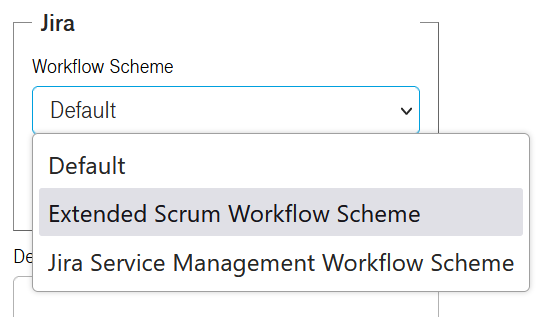
- When a project is created in the Portal, it's now possible in the section for Jira settings to select customized, centrally managed Worflow Schemes. If "Default" is used, a new Workflow Scheme will be automatically created just like before. The benefit of centralized Workflow Schemes is, that more sophisticated Workflows can be used to standardize Jira project settings. See example screenshot below.
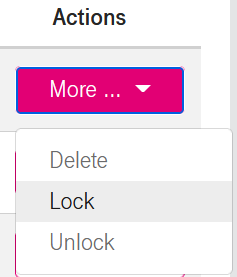
- Technical Users can now be locked and unlocked like other Users. This includes that Technical Users now have to be locked first, before they can be deleted. This allows you to find out first, if a Technical User is really no longer used. If something stops working, you can simply unlock the user again instead of deleting it. The screenshot below shows the enhanced Actions menu.
Improvement
- The setting "Automatically scan images on push" for the Trivy Security Scanner in Harbor is now automatically enabled when a project is saved or created.
- The project description is now put into the folder description in Jenkins.
- Users, which have selected German instead of English as their preferred language in the Portal, will now get also notification emails in German.
- Updated from Spring Boot v2 to v3.
Security
- When a freshly created user was locked, he could reactivate himself using a still valid invitation link. This has been changed. Invitation links are now getting immediately invalid, when the user was successfully activated. If the user does not set a new password instantly after activation, the forgotten password link can be used to set a password.
Bugfixes
- The links to Agile Board and Backlog in the Jira tile of the DevOps Portal homepage did not work properly for users which have more than one project. This was caused by the fact, that agile boards are not part of a Jira project, but instead are independent entities. A new info service is now determining the best available Agile board and will link to it.
Jun 27 2024
Jun 27, 2024,
DevOps Portal 1.6.9
Enhancements
- To allow the complete removal of the LDAP Server in the near future, the DevOps Portal is now managing local user directories in the Atlassian tools Jira, Confluence, and Bitbucket. For the log-in of the users, nothing is changed, Single-sign on (SSO) works as before.
Improvements
- Like Portal Admins, Project admins can now add additional tools to their projects. Please note, that a tool cannot be removed from a project once it was added.