Blog

Last modified by DOaaS Operator on 2025/11/19 16:02

Feb 26 2024

DevOps Portal 1.6.0

Released on January 25, 2024

New Features

AI Engineer

Added support for the new tool AI Engineer developed by T-Systems. AI Engineer is currently exclusively available in DevOps-as-a-Service instances.

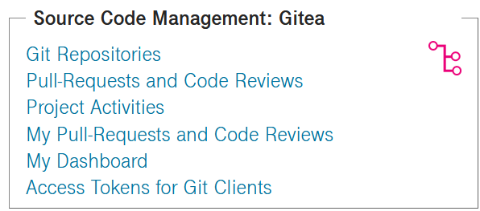
SSO and Project roles are managed as usual in the DevOps Portal. The new tile on the DevOps Dashboard

image-2024-2-14_16-21-44.png

can be used to enter the AI Code Engineer.

image-2024-2-14_16-23-52.png

The AI Engineer can translate code from one programming language to another. It can also produce code from natural text, taking into account context from uploaded documents.

IDEaaS

Added support for the new tool IDEaaS developed by T-Systems. IDEaaS is currently exclusively available in DevOps-as-a-Service instances.

It's a browser based Integrated Development Environment (IDE) enhanced with a special AI plug-in. The plugin offers AI supported code generation which can use the files in your project as context.

SSO and Project roles are managed as usual in the DevOps Portal.

Jira Notification Scheme Management

Portal Admins have now the possibility to select Notification Schemes for Projects in Jira without having a Jira Sysadmin permission. For simple configuration, a new selection box was added to the Edit Project page.

image-2024-2-14_16-31-57.png

The Default Notification Scheme sends an email on nearly any modification of a Jira issue. As an alternative to None, which doesn't send any emails, it's possible to have custom notification schemes added by raising a Service Request at the Service Desk of DevOps-as-a-Service. The screenshot shows an example for a customized scheme named "SDCloud Notification Scheme".

Automated linking of projects accross Atlassian tools

The three Atlassian tools Jira, Confluence and Bitbucket allow linking related projects with each other. Since the DevOps Portal manages Projects accross all tools in the DevOps toolchain it now automatically links projects with the same Project Key in all three tools which each other. This adds more comfort to dialogs, for example when choosing a Git Repository in Btibucket when a branch is created for a Jira issue. This config option is usually only available to users with Sysadmin privileges on the Atllassian tools, but the DevOps Portal handles it now automatically for you in the background. To activate it for an existing project, simply Edit and Save the Project or Resync the Project.

See https://confluence.atlassian.com/applinks090/configuring-project-links-across-applications-1209876486.html for more information.

Automated deletion of personal Git Repositories

Previously, when a user was deleted on Bitbucket all his personal repos were kept. This is a standard behavior of Bitbucket, but can impose security risks. Finding and deleting such orphaned repositories is a hard job in the Bitbucket UI. In addition, users can even make their repositories public, so that they can be accessed without authentication. In general, we don't recommend to use personal repositories. Instead, keep repositories inside a Project for close cooperation with the Project members.

When you delete a locked user in the DevOps Portal, it will now warn you that any personal repos of the user will be automatically deleted.

Automated deletion of personal Confluence Spaces

Previously, when a user was deleted on Confluence his personal space with all pages was kept. This is a standard behavior of Confluence, but can impose security risks. Finding and deleting such orphaned spaces is a hard job in the Confluence UI. In addition, users can even make their spaces public, so that they can be accessed without authentication. In general, we don't recommend to use personal spaces. Instead, keep pages inside a Project space for close cooperation with the Project members.

When you delete a locked user in the DevOps Portal, it will now warn you that any personal space of the user will be automatically deleted.

image-2024-2-14_17-0-4.png

Turbo rendering for entity lists

Several pages on the DevOps Portal can have thousands of entries, like users, projects, organizations and tech users. The new turbo rendering drastically reduces the time until the page is displayed. In addtion when scrolling down, the new entries are rendered in real time. With this new approach, paging becomes useless. With the DevOps portal you can manage users and projects in large enterprises with high speed.

Selection count

In addtion, these entity lists are now counting for you the number of selected entries. In contrast, the already established Displayed count is based on the currently visible entries concerning the search filter. Operations like "Assign" are only performed on entries which are selected and currently visible. Therefore, the selection count helps you to exactly recognize how many elements will be modified when you press the Assign button for changing the roles of users.

image-2024-2-23_17-39-24.png

Enhancements

  • On the Dashboard, the Jenkins tile now has a link to get to your "Favorite Pipelines". In the Blue Ocean UI you can mark multiple delivery pipelines from different projects to be your favorite ones. Just click the star icon on the right-hand side of the branch you are interested in.
    image-2024-2-26_13-11-35.png
  • In addition, the SonarQube tile on the Dashboard now links to "My unresolved issues". In SonarQube you can work there on all unresolved issues in all projects that were assigned to you.

Improvements

  • To improve the scrolling through large list of users, the text in some columns like first name, last name and email is now automatically shortened. Previously, text was wrapped which resulted in different possible heights of rows.
  • Auto-provisioning of Jira is now faster.
  • Emails sent by the portal are now also containing a name in addition to the From email following this template: "CUSTOMER.devops.t-systems.net <noreply@CUSTOMER.devops.t-systems.net>"
  • Adding and removing tools to a DevOps-as-a-Service instance is now easier to achieve.
  • SonarQube Scan results are now automatically deleted when the project is deleted. This avoids problems if the project is recreated with the same project key.
  • Improved automatic testing

Bugfixes

  • Hardened the Portal API to fix a finding from a Portal penetration test.
  • Deleting Bitbucket projects with a lot of repositories inside is now working properly.
  • The password reset link in password expired notification mails is now working properly. The password reset link on the Portal was not affected by the problem.
  • When a user in Portal Role CREATOR had created a new project, the more button of the project did not appear and the project details page could not be opened. The workaround was to relogin, but now it's immediately working.

Nov 23 2023

DevOps Portal 1.5.0

Released on November 23, 2023

New Features

Portal Creator

The new CREATOR Portal role is now available. Portal Creators have more power than standard Portal Users, but less than Portal Admins. In short, the 3 available roles are best explained like this:

  • USER can only access projects for which a role was assigned to him or her.

  • CREATOR can create all kinds of entities like users, projects, organizations and technical users.

  • ADMIN has full-access. Can create, edit and delete all kinds of entities.

Like a normal user, if the CREATOR is a member of the default organization, he can see all users and organizations. Members of other organizations can only see users of their own organization and additionally users which share a project membership with them. There's no exception on this for CREATORs.

In detail, the CREATOR (German: Ersteller) is allowed to:

  • Create Projects
  • Create Users (but no Portal Admins or Creators)
  • Create Tech Users
  • Create Organizations
  • Reinvite Users (but not forcing an activation)
  • See Tech Users with no role assigned (Project count 0)
  • See all Organizations to be able to create new users in any organization
  • View additional information on user detail pages like Portal ADMINs can
  • See remaining licence counts on the pages Projects, Users and Tech Users (but doesn't have access to the Administration menu)

Since the CREATOR can only see projects where he has a role, he is automatically assigned to be a Project Admin for any new project he creates. After adding another Project Admin to a project, he can decide to remove himself.

The CREATOR cannot edit any entity after creation. If by mistake something wrong has been entered in the creation dialog, he has to ask a Portal ADMIN to fix it.

The CREATOR role is the ideal role for somebody who has to onboard some new users and create projects for them. It can make sense to grant the CREATOR role for a limited time to a project manager to improve the self-service. When he has finished setting up new users and projects he could be set back to be a standard user by any Portal Admin.

Known Issues

  • Unfortunately, the links to Agile Board and Backlog in the Jira tile of the DevOps Portal homepage do not work properly for users which have more than one project. In fact, the links will lead to the last visited agile board on Jira, independent to the project selection on the homepage of the DevOps Portal. This is caused by the fact, that agile boards are not part of a Jira project, but instead are independent entities. We are striving to find a solution for the problem in a future version.

Nov 23 2023

DevOps Portal 1.4.6

Released on November 09, 2023

PSA (Privacy and Security Assessment) Compliance

  • The password reset procedure is now protected against automated use or misuse. After entering the email address, the user is now asked for his 2nd factor. This ensures, that it's not possible to spam users with password reset mails. Of course, it requires that 2FA has been enabled for the user. In general, it's recommend to enable 2FA for all your users. Therefore, 2FA has always been enabled by default when you create a new user on the DevOps Portal.

Enhancements

  • Starting with Bitbucket 8.2, a new Create repository permission has been added by the vendor. This new permission is now granted to all users with a MASTER role. To enable it for existing projects, simply initiate a Resync of the project in the DevOps Portal. Please note, that users automatically get admin permissions in the repositories they create.
  • In some tools (currently Jira, Confluence and Bitbucket) Project ADMINs can directly add individual users to their project choosing from one of the available roles or permissions. This is now cleaned-up when a Project Resync is initiated. To be more precise, a Project Resync removes any Project roles or permissions for users which don't have a role assigned in the DevOps portal.

Improvements

  • Prepared the DevOps Portal for configuring tool specific project settings in the future.
  • Updates of used software frameworks and libraries.
  • When a Technical User is deleted, the sort order of the table is now preserved.

Bugfixes

  • On the Projects page, assigning a role to a user which he already has, obviously has no effect. But unfortunately, after such an action the Assign button was disabled, even when another user was selected. This is fixed now.

Known Issues

  • Unfortunately, the links to Agile Board and Backlog in the Jira tile of the DevOps Portal homepage do not work properly for users which have more than one project. In fact, the links will lead to the last visited agile board on Jira, independent to the project selection on the homepage of the DevOps Portal. This is caused by the fact, that agile boards are not part of a Jira project, but instead are independent entities. We are striving to find a solution for the problem in a future version.


Oct 27 2023

DevOps Portal 1.4.5

Released on October 19, 2023

PSA (Privacy and Security Assessment) Compliance

  • Read-only root file-systems are now used inside containers to improve operational security.

Improvements

  • All Bitbucket git repositories have webhooks that notify Jenkins about new branches and commits. These webhooks had been readded using the new internal URL of Jenkins when the Rancher 2 migration was done. Now the webhooks with the old internal URL of Jenkins have been automatically deleted.
  • Improved internal source code quality.

Bugfixes

  • Unfortunately, the notification emails sent out concerning password expiration could contain the same time period that was written in a previous email. This was due to some unwanted caching effect and has been solved now.

Known Issues

  • Unfortunately, the links to Agile Board and Backlog in the Jira tile of the DevOps Portal homepage do not work properly for users which have more than one project. In fact, the links will lead to the last visited agile board on Jira, independent to the project selection on the homepage of the DevOps Portal. This is caused by the fact, that agile boards are not part of a Jira project, but instead are independent entities. We are striving to find a solution for the problem in a future version.


Oct 18 2023

DevOps Portal 1.4.4

Released on October 12, 2023

Improvements

  • The RDMBS used by all DevOps Portal instances were updated from PostgreSQL v10 to v12. This included a well tested transformation of the database files to the new format.

Known Issues

  • Unfortunately, the links to Agile Board and Backlog in the Jira tile of the DevOps Portal homepage do not work properly for users which have more than one project. In fact, the links will lead to the last visited agile board on Jira, independent to the project selection on the homepage of the DevOps Portal. This is caused by the fact, that agile boards are not part of a Jira project, but instead are independent entities. We are striving to find a solution for the problem in a future version.

Oct 04 2023

DevOps Portal 1.4.3

Released on October 04, 2023

Improvements

  • Since LOCKED users cannot reset their passwords, the notification emails about expired passwords which are sent on every Monday and Thursday morning are now only sent to ACTIVE users. In addition, when a user is unlocked, he or she is instantly informed by an email, if the password has expired and needs to be reset. Please note that users cannot log in with expired passwords. They need to reset them before using the forgotten password option on the login page.
  • Updates of used software frameworks and libraries.
  • The view button for pending syncs has been removed, since by clicking on the ID it can be already easily viewed.
  • The success messages for bulk role assignments and unassignments has been improved to give more details about performed or skipped operations.
  • For freshly retired projects, the selection box is now immediately disabled.

Bugfixes

  • The project page wasn't properly working if the user selected for role assignment was deleted in the meantime. This has now been fixed.
  • When a lot of success/error message were displayed on a page it could happen, that a message was hidden below the table header. Now the messages are always the topmost element.

Known Issues

  • Unfortunately, the links to Agile Board and Backlog in the Jira tile of the DevOps Portal homepage do not work properly for users which have more than one project. In fact, the links will lead to the last visited agile board on Jira, independent to the project selection on the homepage of the DevOps Portal. This is caused by the fact, that agile boards are not part of a Jira project, but instead are independent entities. We are striving to find a solution for the problem in a future version.


Sep 26 2023

DevOps Portal 1.4.2

Released on September 21, 2023

PSA (Privacy and Security Assessment) Compliance

  • Passwords of users expire now after 12 months. The current implementation sends emails on every Monday and Thursday morning to users whose password will expire within the next 21 days (3 weeks). The normal procedure is to change the password when logged in to the DevOps Portal using the menu item Account/Password. If the password has already expired, the affected user needs to use the Did you forget your password? link on the login page to reset the password. Please note, that the login page in general does not reveal any information about why a login failed. This is done to not support potential password crackers with any feedback. Therefore, if you cannot log in, always check that the username and password are correct. If this doesn't help, a password reset can be tried, but please note that this will not work if you have been locked in the Portal by a Portal Admin. As a last resort, use the Contact link in the Portal footer to contact a Portal Admin.
  • Passwords cannot be reused within 60 days. The current implementation disallows to change a password more than once within 24h (1 day). In addition, a history is kept of the last 60 passwords. At the end, we recommend using a reliable password manager like e.g. KeePassXC which can create strong random passwords that are stored encrypted on a local drive. Using this approach, there's no problem when a new password has to be set at the DevOps Portal.
  • To improve the security, the account log of the Portal is now also stored in the central logging system of the DevOps-as-a-Service instance.
  • Strict-Transport-Security has been implemented for HTTP response headers where missing.
  • X-Content-Type-Options:  “nosniff” has been implemented for HTTP response headers where missing.
  • Content Security Policy (CSP) implemented.

Enhancements

  • The auto-provisioning backend has been redesigned for improved performance. The changes were also especially important for instances with more than 1000 users.
  • The DevOps Portal is currently being prepared to allow downtime free updates in the future. One of the required changes was to drop the # sign used in deep links to certain pages. Please update browser bookmarks if necessary.

Improvements

  • All user roles in Jenkins have been adapted to the new schema introduced by latest Jenkins versions.
  • The contact email address available in the Portal footer is now also used in the footer of the login page. A shift-reload of the page in the browser will help to get the login page properly updated. As an alternative, the browser cache can be emptied.
  • The number of entities, remaining licences etc. has been stream lined to look exactly the same on all pages.
  • When a project admin has added additional roles to a project member in Jira, these excessive roles are automatically removed when a project sync is triggered. Therefore, each member will get just its well-defined single role as set in the Portal.
  • Several problems for the auto-provisioning of the upcoming tools YouTrack and Gitea have been solved.
  • Updates of used software frameworks.
  • On the Portal Homepage now only active projects can be selected, but no retired ones. This is a preparation for the upcoming enhanced project retirement.

Bugfixes

  • On large instances, it could happen that for locked users, the Confluence licence was not removed. This is fixed now.
  • In the past, a problem could occur in LDAP when the Organization was changed for a user. This has been already fixed, but now some remaining wrong entries in LDAP have been repaired.
  • The Portal allows up to 1024 characters for a project description. Since the text is propagated to the tools it's now automatically shortened to 255 characters for Bitbucket, Gitea and GitLab, since these tools don't support texts longer than this limit.
  • A pending sync could show up on role assignments for users without a Confluence licence. It's been harmless, but will not occur any longer.
  • A pending sync related to SonarQube could show up on role assignments for users in LOCKED or CREATED state. It's been harmless, but will not occur any longer.
  • On a project resync, the project role column was emptied. Now it keeps its content. It was just a visual problem.
  • A JavaScript error sometimes visible in the debug console of browsers has been fixed.

Known Issues

  • Unfortunately, the links to Agile Board and Backlog in the Jira tile of the DevOps Portal homepage do not work properly for users which have more than one project. In fact, the links will lead to the last visited agile board on Jira, independent to the project selection on the homepage of the DevOps Portal. This is caused by the fact, that agile boards are not part of a Jira project, but instead are independent entities. We are striving to find a solution for the problem in a future version.

Aug 04 2023

DevOps Portal 1.4.1

Released on August 03, 2023

Enhancements

  • Upgraded SSO (single sign-on) to Keycloak v20 based on Quarkus, a new Kubernetes-native Java framework.
  • The link to Blue Ocean in the Jenkins tile on the homepage will now apply a search on the currently selected project, and therefore was renamed to Project Pipelines.
  • Adapted auto-provisioning for roles in Jenkins to changed API on latest Jenkins LTS.

Improvements

  • When new tools have been added to a DevOps-as-a-Service instance, the tools can be added to the individual projects by calling Edit and Save or a Resync on the project. For the latter, it's now no longer required to reload the page to get the new tool links listed for the project.
  • The links to Gitlab Runners and Jenkins Credentials are not reachable for all project roles. Therefore, they are now shown or hidden depending on the project role.

Securityfixes

  • When a project role of a user was changed on Jenkins, the old role was not removed. Therefore, if a user was degraded from a project role with many permissions to a role with fewer permissions, he/she still kept the old permission set. This is fixed now for new role changes. It's recommend to run Resync on all projects to correctly update the permissions in Jenkins for all project members. Please note, unassigning project roles was not affected. Therefore, users which were removed from a project in the past, did lose permissions on the Project in Jenkins as expected.

Bugfixes

  • For large customers with a high amount of users, it could happen that an Internal Server Error was shown due to the required increased loading time.
  • Fixed a problem in Confluence role management that could lead under rare circumstances to a pending sync.

Known Issues

  • Unfortunately, the links to Agile Board and Backlog in the Jira tile do not work properly for users which have more than one project. In fact, the links will lead to the last visited agile board on Jira, independent to the project selection on the homepage of the DevOps Portal. This is caused by the fact, that agile boards are not part of a Jira project, but instead are independent entities.

Aug 03 2023

DevOps Portal 1.4.0

Released on July 27, 2023

New Features

DevOps Dashboard

The homepage of the DevOps Portal is now a real dashboard. Just select the project you want to work on and enjoy a list of deep links into the tools to get to the most important places. The chosen project is automatically remembered across sessions.

image-2023-7-27_16-37-54.png

The availability of the tiles depends on the tools which are included in your DevOps-as-a-Service instance. If the logged-in user doesn't have a license assigned for one of the tools, the tile is still displayed, but the links will be not clickable.

Role Management on Projects page

On the Projects page, individual users can be selected to see their roles in the listed projects. Furthermore, bulk assignment of roles in multiple projects to the selected user is now supported.

image-2023-7-27_16-45-23.png

To see only your own roles, simply select again your user, which is always at the very top of the list.

Set reasonable defaults on Bitbucket projects

The following defaults are used for freshly created projects, but can be also automatically set for existing projects by calling Resync on the project or by applying Edit and Save on the project.

The Reject Force Push workflow hook is enabled.

https://prd.sdc.t-systems.net/jira/secure/attachment/18746/18746_image-2022-12-09-12-25-04-873.png

The merge checks No 'needs work' status and No incomplete tasks are enabled.

https://prd.sdc.t-systems.net/jira/secure/attachment/18747/18747_image-2022-12-09-12-24-00-295.png

For permanent exceptions, Project Admins can still override the settings in one or multiple git repositories of the project by choosing explicitly disabled or enabled instead of inheriting from the Project settings.

For non-permanent exceptions, Project Admins can also change the settings globally for the project, but in this case they will be reset on the next Project Resync.

Automated enablement of safe Pull-request builds on Jenkins

In the previous release 1.3.2 enabling safe Pull-request builds was only available for freshly created projects. Now, the settings of existing projects are also automatically adjusted when a Resync is performed on the project or when Edit and Save are applied on the project.

  • Pull-requests opened on Bitbucket are automatically discovered and built on Jenkins. Previously, only real branches were discovered and built.
  • A Pull-request is simulating the merge from one branch to another, but takes place on Jenkins only. To really merge the Pull-request to the destination branch, one of the reviewers has to press the Merge button on Bitbucket when the review and Pull-request builds are fine.
  • The Discover branches strategy is set to all branches to prevent losing build information of the source branch. Instead, the Jenkins Shared Library is avoiding building new commits to the source branch if a Pull-request was already opened. This reduces build work on Jenkins agents to 50%.
  • In Scan Organization Folder Triggers the Interval for Periodically if not otherwise run is reduced from the Jenkins default of 1 day to 1 hour for quicker discovery of new git repositories. We don't recommend to use lower values since Jenkins will be otherwise busy the whole time scanning for new git repositories. If you have created a new git repository, you can at any time click on Scan Organization Folder Now in the Bitbucket Project Folder. This will trigger a manual scan for git repositories. All of this is not required to discover new branches or new commits. Both of these changes are automatically propagated from Bitbucket to Jenkins.

Automated password rotation for implicitly created technical users

DevOps Portal implicitly creates two technical users on each project creation. One is used by Jenkins to pull git repositories from the SCM and one is used by Jenkins to push built artifacts to Nexus. The mechanism was changed to use very strong passwords with 256 random bits. In addition, the passwords are now automatically changed in all 3 tools, every time when the Project is resynced or an Edit and Save is applied on the project. Due to the increased security, we recommend running now a Resync on all your projects and repeat it at least once per year.

Upcoming Features

  • Prepared roll-out of the Competitive Toolchain featuring
  • Automated password rotation as mentioned above is also applied to tools of the Competitive Toolchain.
  • Prepared roll-out of new Portal role Creator. Portal Creators will have more power than standard Portal Users, but less than Portal Admins. The feature will be enabled in a future release.

Enhancements

  • For any pending synchronization, more detailed information was added. The available values are now: ID, Entity, Operation, JSON, URL, Message, Entity Id, timestamp of last attempt, timestamp of first attempt and number of retries. In addition, the process of informing the service desk of DevOps-as-a-Service was improved to allow faster diagnosis of complex problems.
  • New icons have been created for the DevOps portal and the DevOps tools. Where possible, they are now used as favicons or on the new Dashboard as mentioned above.
  • Due to security considerations, the possible uploads to Terms and Conditions has been limited. The only accepted format was set to PDF. The maximum file-size is set to 2MB. Invalid PDFs or PDFs which contain executables will not be accepted.
  • The loading time for the User and Tech User page have been improved for large amounts of entries.

Improvements

  • Project Admins can change roles or permissions for project members in the tools Jira, Confluence and Bitbucket. A Project Resync project will reset modified roles or permissions of project members to the exact roles like defined in the Portal. This was already working for Jira and Bitbucket and has been added now for Confluence, too.
  • Role Management on Nexus is now faster.
  • The T-Systems logo has been updated to the current corporate design
  • Added automated testing for SonarQube
  • Added backend unit tests for Jira
  • Added earlier automated test runs on backend changes
  • Unused library removed.
  • All pop-up messages are now displayed near the bottom of the page.
  • To increase security, some read-only API calls have been removed it not necessary for the operation of the portal.
  • Removed support for old Rancher 1.6.
  • The minimum project name length was set to 2 characters, since 1 character will not properly work with Jira.
  • German texts for the password reset procedure have been improved.

Bugfixes

  • When a user was moved to another organization, it was not correctly updated in the LDAP server. This could lead later to pending syncs.
  • Even on wide windows, the Account menu was cut by some pixels on the right. The menu strip was adapted to fix the problem.
  • Timestamps on some entity detail pages are no longer wrapped if not necessary.
  • Clickboxes for radio buttons and checkboxes were too large on some detail pages and have been adjusted.
  • When a user was locked, its position in the displayed list could change. This is now avoided by applying additional sort criteria.
  • When a tech user was created or deleted, a possible active search filter was not correctly applied to the entries on the page.
  • For some rare circumstances, getting a pending sync for Gitlab is now avoided.


Jul 27 2023

DevOps Portal 1.3.2

Released on April 27, 2023

Enhancements

  • The Bitbucket Project Folder in Jenkins which automatically discovers and builds all git repositories gets now an improved configuration for freshly created projects
    • Pull-requests opened on Bitbucket are automatically discovered and built on Jenkins. Previously, only real branches were discovered and built.
    • A Pull-request is simulating the merge from one branch to another, but takes place on Jenkins only. To really merge the Pull-request to the destination branch, one of the reviewers has to press the Merge button on Bitbucket when the review and Pull-request builds are fine.
    • The Discover branches strategy is set to all branches to prevent losing build information of the source branch. Instead, the Jenkins Shared Library is avoiding building new commits to the source branch if a Pull-requests was already opened. This reduces build work on Jenkins agents to 50%.
    • In Scan Organization Folder Triggers the Interval for Periodically if not otherwise run is reduced from the Jenkins default of 1 day to 1 hour for quicker discovery of new git repositories. We don't recommend to use lower values since Jenkins will be otherwise busy the whole time scanning for new git repositories. If you have created a new git repository, you can at any time click on Scan Organization Folder Now in the Bitbucket Project Folder. This will trigger a manual scan for git repositories. All of this is not required to discover new branches or new commits. Both of these changes are automatically propagated from Bitbucket to Jenkins.
  • On the backend, a feature has been prepared which will offer in the future the possibility to find users inactive for a longer time period like e.g. 90 days
  • The description field of a project is now also propagated to the Jenkins folder of the project.

Improvements

  • Improved backend monitoring
  • The metrics page for Portal Admins was removed since it was of limited value for end-users.
  • Added more automated tests to backend development
  • Moved success and error message more towards the bottom of the screen, so that it's always visible even when scrolling long lists.
  • Error messages concerning the password entry field have been improved to give more exact information about minimum and maximum length.

Bugfixes

  • Fixed the edit tech user dialog so that changing the description without changing the password works again.
  • Fixed a problem when 2FA was switched off for a user.
  • Fixed pending syncs which could happen when a project admin had assigned a role to a user without licenses for freshly added tools, like e.g. SonarQube. The roles were already assigned, so the pending sync could be ignored.
  • Fixed problems in back-end when handling more than 1000 users in the LDAP server.
  • Since no customers are remaining using Rancher 1.6, the user update/lock action can no longer be stuck when the user was assigned to another organization after the user's first project role assignment.