

Blog
Jul 27 2023
DevOps Portal 1.3.2
Released on April 27, 2023
Enhancements
- The Bitbucket Project Folder in Jenkins which automatically discovers and builds all git repositories gets now an improved configuration for freshly created projects
- Pull-requests opened on Bitbucket are automatically discovered and built on Jenkins. Previously, only real branches were discovered and built.
- A Pull-request is simulating the merge from one branch to another, but takes place on Jenkins only. To really merge the Pull-request to the destination branch, one of the reviewers has to press the Merge button on Bitbucket when the review and Pull-request builds are fine.
- The Discover branches strategy is set to all branches to prevent losing build information of the source branch. Instead, the Jenkins Shared Library is avoiding building new commits to the source branch if a Pull-requests was already opened. This reduces build work on Jenkins agents to 50%.
- In Scan Organization Folder Triggers the Interval for Periodically if not otherwise run is reduced from the Jenkins default of 1 day to 1 hour for quicker discovery of new git repositories. We don't recommend to use lower values since Jenkins will be otherwise busy the whole time scanning for new git repositories. If you have created a new git repository, you can at any time click on Scan Organization Folder Now in the Bitbucket Project Folder. This will trigger a manual scan for git repositories. All of this is not required to discover new branches or new commits. Both of these changes are automatically propagated from Bitbucket to Jenkins.
- On the backend, a feature has been prepared which will offer in the future the possibility to find users inactive for a longer time period like e.g. 90 days
- The description field of a project is now also propagated to the Jenkins folder of the project.
Improvements
- Improved backend monitoring
- The metrics page for Portal Admins was removed since it was of limited value for end-users.
- Added more automated tests to backend development
- Moved success and error message more towards the bottom of the screen, so that it's always visible even when scrolling long lists.
- Error messages concerning the password entry field have been improved to give more exact information about minimum and maximum length.
Bugfixes
- Fixed the edit tech user dialog so that changing the description without changing the password works again.
- Fixed a problem when 2FA was switched off for a user.
- Fixed pending syncs which could happen when a project admin had assigned a role to a user without licenses for freshly added tools, like e.g. SonarQube. The roles were already assigned, so the pending sync could be ignored.
- Fixed problems in back-end when handling more than 1000 users in the LDAP server.
- Since no customers are remaining using Rancher 1.6, the user update/lock action can no longer be stuck when the user was assigned to another organization after the user's first project role assignment.
Apr 04 2023
Jira-Jenkins Integration and Gravatar Support
Around Easter, we are starting to roll-out the Jira-Jenkins Integration, as shown in our event Mastering DevOps Toolchain Showcase. Furthermore, we have documented for you how to use the Gravatar Support to get the most out of your DevOps toolchain.
Happy Easter!
Mar 23 2023
DevOps Portal 1.3.1
Released on March 27, 2023
Enhancements
- The Technical Users page can now be used by all Portal users. In general, only these Tech Users will be listed which share a project with the user. In addition, the roles for these Tech Users can be changed, but of course limited to the Projects where the user has an Admin role. Creating, Deleting and Editing of Tech Users is still limited to Portal admins.
- Due to updated PSA statements of compliance, the minimum length for passwords of technical users has been increased to 32.
- Resync roles as found in a Project's more menu has been replaced by Resync. The new Project Resync combines saving a Project and resending the roles. Therefore, the Resync guarantees at any time that all Project details including defined member roles are properly set-up in all the tools. When you've ordered additional tools, like e.g. SonarQube, it's advised to call Resync on the Projects which should get support for the new tool.
When a role is added to a locker user, the role is added only on the portal, but not inside the tools. If the user is later unlocked, all roles are automatically restored in the tools.
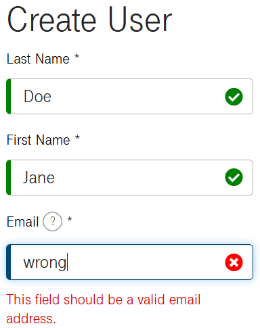
- Additional icons like shown in the example screenshot below now give a fast feed-back if the entered content was ok or not. Since the icons can be clearly distinguished from each other just by their shape, it's also an improvement for color-blind users.
Improvements
- Developed code that will be later used by the portal to allow removal of non-standard roles or individual permissions that have been set by Project admins directly in tools. This will allow in the future to improve the resync feature for projects in the portal.
- Improved display of timestamps and empty strings in pending syncs.
- Improved keyboard control as well as the contrast of the colors for all pages to improve accessability of the Portal.
- Improved support for screen readers.
- Two back-end components have been merged to simplify development.
- Base image and all dependencies used by the back-end have been updated to latest versions.
- Automated tests now run faster and don't unnecessarily block Jenkins agents when waiting for test environments.
- Shifted automated testing to new clusters based on the Rancher-Longhorn architecture.
Bugfixes
- Fixed problems in the LDAP server when handling more than 1000 users.
- Relaxed time-outs between the portal server and the auto-provisioning back-end to avoid pending syncs showing up with error message "I/O error clap-api:5000 failed to respond". This was necessary since some operations of the auto-provisioning can take longer since multiple tools have to be configured.
- Locking and deletion of users were not properly working on Rancher1.6, if the user had a personal default environment.
- In rare cases, e.g. after a timed-out session, the Portal can show its own login dialog instead of the SSO login page. That has been fixed for most cases. If it happens to you, simply reload the page to get to the correct login page.
- Vulnerability fixed which would have allowed an authenticated portal admin to change the userid/email of a user, leading to problems in the tools.
- For users that never logged in to SonarQube, a harmless pending sync could show up when a role was saved.
- A timeout was added to a query all projects call towards Jenkins to avoid hanging requests due to possible Jenkins malfunctions.
- Fixed a problem related to multi-threading in the back-end.
Known Issues
- User update/lock action can be stuck when the user was assigned to another organization after the user's first project role assignment. The ops team will automatically repair it for you. Problem is fixed for customers which have Rancher v2.6 in their toolchain as it happens only with Rancher 1.6.
Jan 16 2023
DevOps Portal 1.3.0
Released on January 12, 2023
Enhancements
- Added full support for Rancher 2 auto-provisioning.
- If Rancher 2.6 is available in your toolchain, all users which have the RANCHER2 tool assigned receive the global permission User-Base on Rancher. User-Base users have login-access only. But they can be added to clusters and namespaces.
- All users who have at least one project admin role get the global permission Standard User on Rancher. These users can create new clusters and use them. Standard users can also assign other users access permissions to their clusters.
- The portal now automatically maintains a group on Jira named project-admins which contains all users which have at least one project admin role. This group will be used to manage the access permissions for the Jira Roadmap Feature of the Jira Data Center edition. More about this will be made public in a separate posting.
- The view and edit project pages have been unified. Therefore, the actions View and Edit have been removed from the More menu. Simply click on the project key of a project to view it. If you want to change any data, tick the checkbox Edit Details. This is only available if you have the admin permissions on the project and the project you want to edit is in ACTIVE state at the moment.
When a new user is created or an existing user is changed and the new portal role or the old portal role is admin, all other admins are informed by mail who did the change and which user was made a portal admin or lost the role.
- All pages have been improved concerning accessibility.
- Required fields now have an additional * symbol, so you know that you have to enter something in any case.
- Status and error messages are now correctly marked for screen readers.
- Error messages related to input fields have been moved to the label to support screen readers.
- Detail dialogs of projects, users, technical users, organizations and usage terms can now be opened using CTRL and left mouse button in a new browser window. This allows for fast processing of multiple entries.
- When multiple browser tabs are used to open the different tools, it was hard to distinguish which tab is for which tools. Therefore, our favicons as known from https://geschaeftskunden.telekom.de/digitale-loesungen/infrastructure-as-a-service/devops-as-a-service#leistungen are now used for Jira, Confluence, Bitbucket and gitlab. Since your browser caches favicons for a longer time, it's possible that you still see the old favicon. If this is the case, try holding the shift key while you press the reload button in the browser. That will force the reload of the favicon. Icons for the remaining tools will be added in the future.
Improvements
- The notification mails that users receive about changes in their licence assignments now contain a list of tools that is sorted like in the portal.
Bugfixes
- Changes in the description field of a project were not set on Bitbucket if the name of the project was not changed, too.
- Small bugfixes concerning auto-provisioning of Rancher 2 and SonarQube.
Known Issues
- User update/lock action can be stuck when the user was assigned to another organization after the user's first project role assignment. The ops team will automatically repair it for you. Problem is fixed for customers which have Rancher v2.6 in their toolchain as it happens only with Rancher 1.6.
Dec 09 2022
DevOps Portal 1.2.9
Released on December 14, 2022
Enhancements
- The previous version was released just for some customers, therefore make sure to also read its release notes. The most important feature that was added is full support for SonarQube. Please follow the link to get a complete overview about our SonarQube offering, how it's integrated into the portal and how to use it.
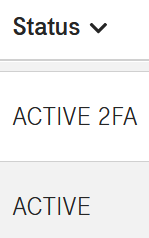
- Whether 2FA (Two-factor authenthication) is enabled or not for a user can now be directly seen in the status column of the users list. Sorting by status works as expected. You can also use the search box to search for any status like e.g. only "2FA" or "LOCKED 2FA", etc.
Bugfixes
- When a user is locked or saved after editing it can happen that the portal lists a pending synchronization, if the user cannot be found on SonarQube because he or she never got the tool assigned. This warning is harmless and was fixed.
- For customers which have their own support email address configured in the portal footer there is the following issue: permanent pending syncs are sent as a warning email to this address. This was not intended and was fixed. Warnings are processed by the Service Desk DevOps-as-a-Service.
Known Issues
- User update/lock action can be stuck when the user was assigned to another organization after the user's first project role assignment. The ops team will automatically repair it for you. Problem is fixed for customers which have Rancher v2.6 in their toolchain as it happens only with Rancher 1.6.
Dec 07 2022
DevOps Portal 1.2.8
Released on December 01, 2022
Only released to SonarQube pilot customers.
Enhancements
- Now offering SonarQube as an additional optional tool with full integration into DevOps-as-a-Service. The latest version of SonarQube - at the moment of writing - v9.7.1 is offered. Project roles are fully managed by the DevOps portal. Please note that SonarQube projects are different to projects in the DevOps portal and the existing tools. In Bitbucket a project can have multiple git repositories which all have their own build pipelines in Jenkins. SonarQube projects contain the scan results of just one git repository. They are created on-the-fly using the Jenkins Shared Library when a scan is executed but the projects is not yet existing. To activate SonarQube it's required to save every project in the DevOps portal first. After this step SonarQube can be added to individual users just by editing them. More information about SonarQube and its integration into the DevOps toolchain will be published seperately.
- Auto-provisioning for project roles in Rancher 2.6 was added.
Improvements
- Since LDAP cannot properly handle organization names which differ just concerning uppercase and lowercase letters, the check for unique organization names is now case-insensitive.
- Improved testing of auto-provisioning for Confluence, Bitbucket and Keycloak.
- Updated to more recent nodejs and npm versions.
- Improved JavaScript code.
- Moved more internal testing to new Rancher 2 RKE clusters.
Bugfixes
- Improved layout of bubble help pop-ups.
Known Issues
- If a user is locked or saved after editing it can happen that the portal lists a pending synchronization if the user cannot be found on SonarQube because he or she never got the tool assigned. This warning is harmless and will be fixed in the next release.
- For customers which have their own support email address configured in the portal footer there is the following issue: permanent pending syncs are sent as a warning email to this address. This was not intended and will be fixed in the next release.
- User update/lock action can be stuck when the user was assigned to another organization after the user's first project role assignment. The ops team will automatically repair it for you. Problem is fixed for customers which have Rancher v2.6 in their toolchain as it happens only with Rancher 1.6.
Nov 11 2022
DevOps Portal 1.2.7
Released on November 02, 2022
Enhancements
- Unified the view and edit dialog for Technical Users like it was already done for Users. Now it's also possible to change the description of a Technical User without changing its password.
- Unified the view and edit dialog for Organizations like it was already done for Users.
Improvements
- On the Organizations page the displayed count for visible and total number of Organizations was added, as well as a bubble help which desribes the purpose of Organizations.
Bugfixes
- When a user record was edited, it could happen that pending syncs complained about different upper and lower cases in email addresses in the Portal versus Jira and Jira Service Management.
Known Issues
- User update/lock action can be stuck when the user was assigned to another organization after the user's first project role assignment. The ops team will automatically repair it for you. Problem is fixed for customers which have Rancher v2.6 in their toolchain as it happens only with Rancher 1.6.
Oct 28 2022
DevOps Portal 1.2.6
Released on October 19, 2022
Enhancements
- Two Factor Authentication (2FA) can now be activated or deactivated for each user directly in the portal. To change it go to the users details page and set or unset the checkbox.
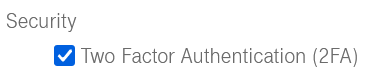
2FA improves the security of your DevOps toolchain since users will be prompted for an additional one-time password (OTP) in addition to their normal credentials during the login. Users with 2FA enabled will need to use an application that implements the Time-Based One-Time Password Algorithm (TOTP) as defined in RFC 6238. Usually a mobile application like e.g. Google Authenticator or Microsoft Authenticator for Android/Microsoft Authenticator for iOS is used for that. If a user loses it's mobile phone simply disable 2FA, save the user details and afterwards enable 2FA again. This will make sure that the association with the authenticator app is deleted, so that the user can connect a new app. In the Create User dialog 2FA defaults to true. SSO Realm Names have been changed from "DevOps as a Service" to the domain name of your instance, e.g. CUSTOMER.devops.t-systems-service.com or CUSTOMER.devops.t-systems-service.net. This will avoid duplicate entries in mobile apps like Google Authenticator and allows you to easily distinguish between multiple instances if necessary.
- A column was added to the list of organizations which shows when the organizations were created.
Improvements
- To improve the support for your users we are now offering the possibility to change the contact link in the portal footer. Please create a service request to have it changed.
- Automated notification emails sent by the DevOps portal will no longer mention the T-Systems DevOps support email address, but instead link to your DevOps portal. This will ensure that users with questions e.g. about role changes will be able to contact the right people.
- To avoid problems in some of the DevOps tools the length of the firstname and lastname for users as well as the length of organization names was limited to 64 characters.
- The description field for technical users was limited to 1024 characters.
- The term Global Role was renamed to Portal Role to more clearly specify to what ADMIN and USER refer to.
- Activated date and unlocked date are now only viewable by portal ADMINs or for the own user to keep this information more private.
Bugfixes
- A bug was fixed which could prevent organization name changes in some cases.
- Work-around for Jira problem: the auto-provision code for Jira can now sucessfully process Jira API replies which in some cases can return already deleted users.
- For locked users the activation timestamp was not shown on the user details page.
- Project counter was not updated immediately for users or technical users when they were assigned or unassigned from a project.
- Fixed a text problem on the metrics page.
Known Issues
- User update/lock action can be stuck when the user was assigned to another organization after the user's first project role assignment. The ops team can automatically repair it for you. Will be fixed when the Rancher in customer's toolchain is updated from v1.6 to v2.x.
Aug 29 2022
Field for Estimated Time now visible in Service Management Portal
We would like to introduce a new field which is now visible in Service Management portal for the issue type Service Request. The "Estimated time in hours" field notifies the customer about the agreed and accepted estimated time to fulfill the request.
(In the following screenshot the approved 4 hours can be seen in the Estimated time in hours field.)
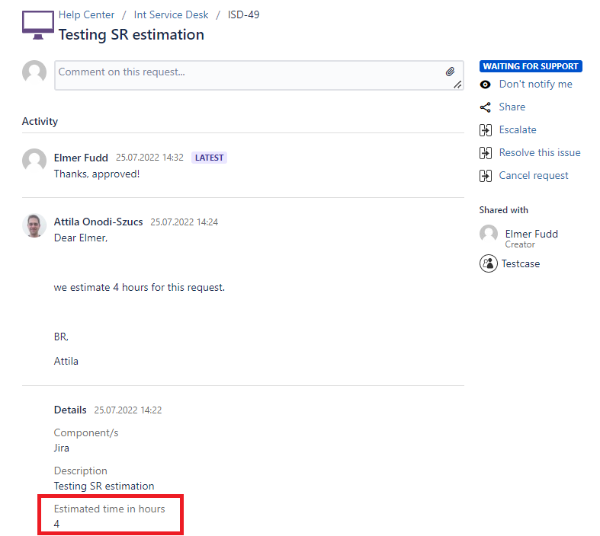
This field is handled by the Support Team, and it is visible only when the estimated time is recorded for the field.
Aug 01 2022
DevOps Portal 1.2.5
Released on August 03, 2022
Bugfixes and Improvements
- The DevOps Portal application was upgraded from JDK 11 to JDK 17.
- The font used in the single-sign-on (SSO) page was enlarged for better readability.
- Timestamps for the activation of an user as well as for the last unlock operation invoked on the user are now recorded. The timestamps are displayed on the users details page.
- On pages with data entry fields the first field is now automatically focused so that you can type immediately without the need to select the field before.
- The Portal will now accept emails up to an length of 64 characters.
- Added more automated test cases to the development process.
- Preparations for developing and operating the portal on Kubernetes only.
Known Issues
- User update/lock action can be stuck when the user was assigned to another organization after the user's first project role assignment. The ops team can automatically repair it for you. Will be fixed when the Rancher in customer's toolchain is updated from v1.6 to v2.x.