

Blog
Jul 06 2022
DevOps Portal 1.2.4
Released on July 06, 2022
Enhancements
Bulk Role Management for Technical Users. The role management for technical users is now integrated in the Technical Users page like it was done for users in the previous release. This new feature allows you to assign or unassign project roles to multiple technical users in just one action. It's also perfect to get an overview about already assigned roles in a specific project since it really shows all available information about the affected technical users. Usage is very simple: select the project in the combo box and see the users sorted by project role below. Two dashes ("–") are used as a symbol for no role. Global or project admins can change the role of technical users by selecting them with the check boxes on the left-hand side and then use the Assign button to assign the desired role to these technical users. To remove roles simply select "–" as new role. The selection in the combo boxes project and new role are persisted accross sessions.
- The view and edit user pages have been unified. Therefore the actions View and Edit have been removed from the More menu. Simply click on the last name of a user to view him. If you want to change any data tick the checkbox Edit Details. This is only available if you have the global admin role and the user you want to edit should not be LOCKED at the moment. To be able to edit a LOCKED user first UNLOCK him.
- Users now get an email if their account was modified on the above mentioned edit page.
- For ordinary users the amount of used and remaining licences is no longer shown anywhere.
- Users which are not in the default organisation can see only other users in the same organisation or users which are members of a common project. This also works when viewing the details of a user. Confidential information like e.g. tool assignments or creation date are not displayed.
- To save one click, the login form is now immediately shown when navigating to the portal and there's no active session.
- The queue handling, which in the background manages the auto provisioning of the tools, was massively improved to avoid any deadlocks concerning conflicting changes fired at high pace.
- Pending syncs are now more readable.
Bugfixes and Improvements
- The assignment and unassignment of Jira Service Management licences for users and technical users was broken and is now fixed.
- The item count was not displayed for standard users on User page.
- Resync roles has been forbidden for retired projects to prepare for the full implementation of project retirement. To resync roles for a retired project simply reactivate it.
- Some improvements for narrow screens. Improved widget reflow.
- Burger menu is now closed after selecting the User Profile menu item.
- Upgraded version of Keycloak used for single-sign-on.
- Updated version of database server instances.
- Adapted auto-provisioning to changed APIs at Jenkins.
- Improved automated testing for an even better QA concerning UI and end-to-end behavior.
Known Issues
- User update/lock action can be stuck when the user was assigned to another organization after the user's first project role assignment. The ops team can automatically repair it for you. Will be fixed when the Rancher in customer's toolchain is updated from v1.6 to v2.x.
May 17 2022
Jenkins Library 2.4.0
Enhancement
Code Analysis: if Python modules (.py files) exist in the git repository they will be analyzed using pylint and flake8. If pylint or flake8 are not available on the Jenkins agent the steps will be skipped. Python files that are generated or downloaded into the workspace will not be checked.

For complete documentation see Jenkins Shared Library.
May 09 2022
DevOps Portal 1.2.3
Released on May 05, 2022
Bugfixes and Improvements
- Fixed no longer working Jenkins auto-provisioning by switching authentication to API tokens.
- Selection checkboxes for entries on the Users page are no longer shown if logged in user is not allowed to use the role assignment for the currenty selected project.
Known Issues
- User update/lock action can be stuck when the user was assigned to another organization after the user's first project role assignment. The ops team can automatically repair it for you. Will be fixed when the Rancher in customer's toolchain is updated from v1.6 to v2.x.
May 09 2022
DevOps Portal 1.2.2
Released on April 28, 2022
The term Self-Service Portal has been replaced by DevOps Portal.
Enhancements
- Bulk Role Management for Users. The role management is now integrated in the Users page. This great new feature allows you to assign or unassign project roles to multiple users in just one action. It's also perfect to get an overview about already assigned roles in a specific project since it really shows all available information about the affected users. Usage is very simple: select the project in the combo box and see the users sorted by project role below. Two dashes ("–") are used as a symbol for no role. Global or project admins can change the role of users by selecting them with the check boxes on the left-hand side and then use the Assign button to assign the desired role to this users. To remove roles simply select "–" as new role. The selection in the combo boxes project and new role are persisted accross sessions.
- All projects now automatically get a RAW repository on Nexus OSS (if the tool is available) with the name <Project Key>-raw. Basically a RAW repo is like a static HTTP server. You can use it to publish HTML pages, e.g. JavaDocs or any other static files which are not covered by the programming language specific repo formats. RAW repos have also been added to all existing projects.
- On the Technical Users page the number of assigned roles for each tech user is now displayed
- On the Organizations page the number of members in each organization is now displayed
- Improved accessability of the portal to allow better usage by users with disabilities. This includes e.g. correct formatting of pages with very high zoom factors, screen reader support, high contrast mode support, alternatives to just using colors for information transport, etc.
- Tables now have only one link per row which is used to open the item in view mode
- Portal now perfectly usable on mobile devices with smaller screens
- Page titles for e.g. browser tab names now include the portal name which improves navigation in a crowded browser
- On the Projects page users now only get deep links for tools which they can really access. Tools for which a user doesn't have a licence assigned are no longer listed. Global admins who can see all projects will get just tool names without links for each project where they don't have currently a role assigned.
- Updated Portal to new versions of the underlying technology like JHipster and Angular.
Bugfixes and Improvements
- Technical users for Jira cannot be completely deleted on Jira when they have issues assigned. Instead they will be set to inactive in Jira. If you want to have a tech user completeley delete in Jira make sure to unassing all issues before deleting the user in the portal.
- Improved robustness of auto provisioning when one or multiple tools are not available during auto provisioning process
- Searching for special characters like ! or ? in the status field of users works again
- Creating Tech Users for Jira Service Management works again
- Fixed some problems caused by the renaming of Jira ServiceDesk to Jira Service Management.
- Adding more code for upcoming Rancher 2 support
- Improved menu bar for narrow screens
- Project list on User Detail pages is now alphabetically sorted
- The validity of links in user activation mails and password reset mails is now always correctly specified in localized format, also for non default time periods.
- Simplified readability of License Usage page
- Numbers in tables are now right-aligned for better readability
- Now avoiding flickering due to error messages like "Password is too short" while typing in a new password
- Updated data base version
Known Issues
- User update/lock action can be stuck when the user was assigned to another organization after the user's first project role assignment. The ops team can automatically repair it for you.
Jan 28 2022
Self-Service Portal 1.2.1
Roll-out to customers starting Unknown macro: time. Click on this message for details.
.
Enhancements
- The projects page now shows the amount of members of a project. Suitable to learn about the size of a project. Old projects with 0 members are certainly good candidates for a retirement.
- Issue-type schemes in Jira are now automatically deleted when the matching project is deleted on the portal.
- Prepared the UI at multiple places for the upcoming Bulk Role Management feature.
- Prepared LDAP structure for the upcoming Rancher 2.x auto-provisioning support.
- Adapted security measures to the upcoming hosting based on Rancher 2 and Kubernetes.
Bugfixes and Improvements
- Streamlined the different pages so that similar things are solved similar.
- The top magenta header is now better aligned and uses less space.
- Jira ServiceDesk was renamed to Jira Service Management to reflect the change of the product name of Atlassian. The short version is ServiceMgmt.
- Changes on the Terms & Conditions are now logged to the audit log.
- Audit log now shows real usernames instead of UUIDs for logins.
- Searching for translated columns is now working using the currently selected locale.
- Projects could not be created if a Rancher environment with the same prefix had been already manually created.
- Caching problem after version update is now solved. Reload message will no longer appear starting with 1.2.2.
- Improved automated testing during development.
Known Issues
- User update/lock action can be stuck when the user was assigned to another organization after the user's first project role assignment. The ops team can automatically repair it for you.
Jan 20 2022
Jenkins Shared Library v2.3 released
SDCLOUD-3046 For maven projects the default values of imageName, appName and helmReleaseName are now automtatically set to the artifactId as defined in pom.xml. For appVersion the version as defined in pom.xml is used. For all other types of projects the default remains to be the name of the build job respectively '1.0.0'. The default for chatVersion has been slightly changed, too. Now appVersion with '00' appended is used. Of course you can still override all of these values by passing the matching arguments to sdcPipeline().
See Jenkins Shared Library for more information.
Dec 08 2021
Self-Service Portal 1.2.0
Enhancements
- When the portal creates a new project on Jira an associated Agile Scrum Board is automatically created, too. In the past users could not modify the configuration of this default board. Now if a new ADMIN role is assigned the user will be automatically added to the list of administrators of the board. This allows project admins to configure the board like they wish. One of the most useful possibilites is to add new columns and statuses. By doing this, new kinds of workflows can be created on the fly for the project. See Jira#ManageBoards for complete instructions. To put all existing ADMIN users of a project to the list of board administrators simply invoke Resync Roles using the More menu on the Projects page of the portal. This feature is available both to Project Admins as well as to Global Admins. Further changes to the roles will automatically sync with the list of board administrators.
- A User Profile page was added to the Account menu which shows information about the own user account.
- Added search filter for Technical Users like already available for Users.
Bugfixes and Improvements
- Searching now also considers the created timestamp of Projects and Users.
- For Projects, Users and Technical Users the page header now shows the amount of displayed items when the search is used, but also shows always the total amount of items.
- The amount of used licenses is now also in detail calculated for Open Source tools. See Administration / Limits in the portal for more information.
- Massively improved the German translation of the portal.
- The validity of invitation links in invitation emails is now by default 1 week. You still can send out new invitations by using the Reinvite menu item in the More menu of the affected user.
- The footer is now always displayed at the very bottom of the page and displays the complete content also on very narrow windows.
- Due to data privacy issues the created timestamp and list of assigned tools for other users than themselves can no longer be seen by ordinary users. It's still available for Global Admins.
- Solved problem with removing user roles in Gitlab which could be triggered only in some special conditions.
Known Issues
- User update/lock action can be stuck when the user was assigned to another organization after the user's first project role assignment. The ops team can automatically repair it for you.
Mar 26 2021
New phone number for DevOps as a Service Helpdesk
We want to inform that our DevOps Helpdesk number has changed.
- new number: +49 69 9731799115
Our old number has been replaced by the new one.
The number is available since 25.03.2021 and occupied between 08-18 CET.
Mar 11 2021
Initial Rollout of Single-Sign-On (SSO)
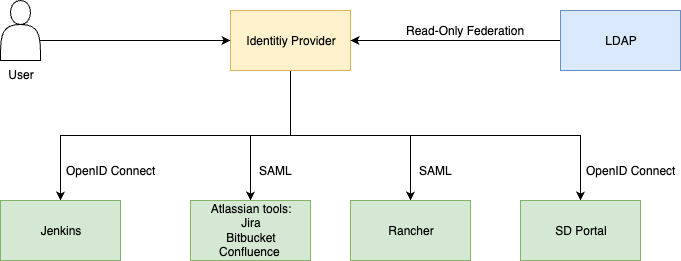
Beginning at next week we start the initial rollout of SSO for most of the customers. This initial rollout includes the deployment of the basic infrastructure and providing SSO for the Atlassian tools Confluence, Jira and Bitbucket.
Some of the preparation work can be done in the background, but to reconfigure the tools a maintenance window is required. The affected customers are going to receive corresponding maintenance tickets for information and approval of the maintenance work for SSO.
When SSO is enabled for a specific tool, then the login doesn't occur locally in the tool anymore. The user is rather redirected to a central login page, which performs authentication centrally on behalf of the tools. As a result, login must only be performed once and the established authentication session also automatically authenticates a user against the other tools.
The Password Reset function remains unchanged, there is a link at the login page which refers to the reset page.
2-Factor-Authentication (2FA) is prepared and can be configured on demand per User. If a customer wants to have 2FA for users activated, then it's performed based on a Service Request for the defined list of users. We decided against to enforce 2FA for all users, because there are side-effects for technical users possible. There is already a user story in our backlog to integrate 2FA per user in the self-service-portal.
Technical users for the Atlassian tools have already been stored locally in the tool. This remains unchanged with SSO. As a consequence, technical users can still use the Rest-API with local authentication (unchanged) but can't login to the Web-UI anymore. When SSO for Jenkins is going to be rolled out, then there are some preconditions required regarding technical users.
To provide SSO as early as possible and to minimize risks during migration we decided to rollout SSO step-by-step for the different tools. So, the initial rollout includes Confluence, Jira and Bitbucket. In a next step, the self-service portal and Jenkins will be added. GitLab and Rancher will be added at the end. Due to technical reasons, Nexus is not going to be included in SSO. This should not be an issue, because there is only a seldom requirement to manual login into Nexus.
We think, that the introduction of SSO is a significant step forward making DevOps-as-a-Service a better and safer product.
Sep 08 2020
DevOps-as-a-Service is PSA approved
The Project DevOps as a Service as well as the included System SDCLOUD Release 1.0 have passed the PSA process. These are the official identifiers used in the PSA process of Deutsche Telekom Group for the product DevOps-as-a-Service.
The Privacy and Security Assessment (PSA) process was introduced to ensure compliance with security and data privacy requirements in development projects. It regulates support and advice from security and data privacy experts – Project Security Manager (PSM) and Data Protection Consulter (DPC) as well as the security and data privacy approval of the systems.
The process has three main objectives:
- A consistent and adequate security and data privacy level in all products, systems and platforms that have to be updated or created from scratch.
- A support level adapted to project complexity and criticality through the introduction of categorization at the start of each development project.
- An integrated process for information security and data privacy as part of the product and system development process (to avoid redundancies in the approval process).
The process can be used on all IT and NT systems, regardless of size and complexity. It ensures greater transparency, improved project support and an adequate level of protection for products from the Deutsche Telekom Group.
Please see the PSA Booklet for more information:
Unknown macro: pdfviewer. Click on this message for details.