

Blog
Last modified by DOaaS Operator on 2025/11/19 16:02
May 20 2026
May 20, 2026,
DevOps Portal 2.2.7
Enhancements
- Customers can now opt in to an automated procedure that aims to save unused seat licenses for a named list of tools. The default config of the feature will send emails twice a week to users which have not logged in for 60 days to one of the tools selected by the customer. The email asks the user to simply log in to the tool to be regarded again as actively using the tool. If this is not done, and the grace period of 10 days has passed, the license is removed from the user. If the user needs the tool access again later, he or she has to contact the Portal Admins so that they assign again the license to the user.
Bugfixes
- When a project key was used which was a substring of another project key, the Portal could not successfully manipulate the project in SonarQube.
May 14 2026
May 14, 2026,
DevOps Portal 2.2.6
Bugfixes
- When another role for the same project was set for a Jira tech user, the new role was added, but the old one was not removed. This has been fixed and all affected tech users have been correctly configured.
- The config-deptrack-project API call which is used in the Dependency Track stage of the Jenkins Shared Library failed with an error. This isn't a problem with already existing deptrack projects, but impedes the correct configuration of new projects. This has been fixed in the auto-provisioning backend.
- When the portal was saving a project with Dependency Track enabled, this could lead to a pending sync when unusual characters (e.g. symbols) were used in the project description. These characters are now filtered and no longer send to Dependency Track.
- Adapted backend to a change in AI Operator to make DELETE requests work again.
May 07 2026
May 7, 2026,
DevOps Portal 2.2.5
Enhancements
- Added support to auto-provision the new upcoming tool T-Tracker for service management.
- The new global role "Rancher 2 extended rights (can create clusters)" can now be assigned to users which have the tool Rancher2 assigned.
Previously these extended rights had been automatically assigned to users which had at least one Project Admin role. This is no longer the case. Therefore, please assign the extended rights to any user who needs to be able to create new clusters in Rancher. The setting does not influence any role or permission inside existing clusters. - The new global role "Can save Advanced Roadmap plans and can manage shared teams" can now be assigned to users which have the tool Jira assigned. At the same time the Advanced Roadmap feature has been enabled for all customers which have Jira. It's accessible using the "Plans" menu in the top menu bar of Jira.
- In some tools it was possible to login without a license assigned, but seeing not any data, since all roles in a tool are automatically removed if a tool is unassigned from a user. The Identity and Access Management now makes sure that no login at all is possible to any tool for which the user doesn't have a license assigned.
Extended Xray for Jira support
When Xray for Jira is used for test management, a new bunch of permissions is now automatically set to allow project members to sort tests into folder structures.
Project permissions
| Permission | Roles |
|---|---|
| [Xray Test Repository] Create folders Allows users to create folders on the Test Repository. | Admin, Master, Developer |
| [Xray Test Repository] Delete all folders Allows users to delete any folder on the Test Repository. | Admin, Master |
| [Xray Test Repository] Delete own folders Allows users to delete their own folders on the Test Repository. | Admin, Master, Developer |
| [Xray Test Repository] Move/edit all folders Allows users to move and edit any folder on the Test Repository. | Admin, Master |
| [Xray Test Repository] Move/edit own folders Allows users to move and edit their own folders on the Test Repository. | Admin, Master, Developer |
| [Xray Test Repository] Move issues Allows users to add, remove and move tests on the Test Repository. | Admin, Master, Developer |
Issue permissions
| Permission | Roles |
|---|---|
| [Xray] Override Assign Test Runs Allows users to set the Test Run assignee without the Edit Issues and Assign Issues permissions. | <none> |
Since Admin, Master and Developer have the permissions Edit Issues and Assign Issues, there's no need to add anybody here, since for Viewer it doesn't make sense.
Improvements
- Adapted auto-provisioning to support changes in API call replies in SonarQube 2026.1 LTA and later.
- The Rest API now supports querying the audit log at /api/v2/audits.
- Backend is now more robust when dealing with large result sets of auto-provisioned tools.
- Improved password reset success message describing that locked users or users which have not activated their account yet will not receive password reset instructions.
- The rules for passwords are now better explained, so that it's easier for the user to enter a valid password when changing it.
- Usability has been improved for quicker understanding which fields in forms are mandatory.
- For better readability the contrast ratio of all elements has been improved where necessary.
- The table layout of pending syncs has been improved to make better use of the available space on the screen.
Apr 01 2026
Apr 1, 2026,
DevOps Portal 2.2.4
Enhancements
- The function Retire Project has been renamed to Close Project. In the German translation this term was already used before. In addition, the behavior of the feature has changed. Both functions Close Project and Delete Project are only available to Portal Admins as before. It's also unchanged that a project needs to be closed before it can be deleted later. When closing a project, the Portal asks for a confirmation first, which includes a warning that all Role Assignments for Users and Tech Users will be lost and cannot be recovered. Like for deletion, the project name needs to be entered for the confirmation. When the DevOps Portal sets the status to Closed, all role assignments of Users and Tech Users are deleted, too. All role removals are recorded in the audit log, exactly like if the actor had removed the roles manually. Only Portal Admins can see closed projects, because they don't need a role in projects to see them. Portal Admins cannot add roles again without Reactivating the project first.
- The in-memory cache of the DevOps Portal was replaced by a distributed memory cache. This will allow to scale the Portal in the future, i.e. run multiple instances at the same time. In addition, this will enable down-time free updates in the near future by running an old and a new version of the Portal in parallel for a short period of time.
Improvements
- Customers can now raise service requests, if they want to have a tool removed from an existing project. Please double check which project and tool, since this can lead to unrecoverable data loss.
- Added more visual indications when an invalid time period is selected on the Audits page.
Mar 06 2026
Mar 6, 2026,
DevOps Portal 2.2.3
Improvements
- Additional links have been added on the Dashboard for the tools Jira, SonarQube and Dependency Track, partially depending on the presence of project roles or global roles which allow to use the linked functionality.
- Customers can now raise service requests, if they want to have a tool removed from an existing project. Please double check which project and tool, since this can lead to unrecoverable data loss.
- Adapted auto-provisioning for XWiki v17 and better.
- When a user is locked, he/she is immediately blocked doing any calls within the DevOps Portal if the user is currently logged in.
Bugfixes
- Projects could not be retired when the license limit was reached.
- The rule for valid email addresses now accepts consecutive '-' and '_' characters. This is not allowed by the RFC, but unfortunately addresses like this can be found in the wild. Measures have been taken that these non-standard addresses are also accepted in the managed tools.
- When technical users are sorted by status and the status of an entry is changed, the sort indicator is now correctly removed.
- When you logged out from the Portal in the last version, unfortunately the log out was not recognized in other browser tabs or windows. This is fixed now.
Feb 16 2026
Feb 16, 2026,
DevOps Portal 2.2.2
Improvements
- Customers can now issue a service request to have a certain set of tools preselected, when they create a new project or user.
- Updated Angular to fix some vulnerabilities.
Bugfixes
- When a project was saved, the project lead in Jira was set to sdcloud-admin since the previous version 2.2.1. This is fixed now, so if any user is set as the project lead, it will be kept.
- In some rare cases it could happen that Portal Technical Users were not listed on the Technical Users page. This is fixed now, so that refreshing the page is no longer required. Please note that Portal Technical User for Portal API access are only available, if you use a service request to enable the feature on your instance.
- In some rare cases it could happen that the Log-in button in the Re-Authenticate dialog was not clickable.
Feb 12 2026
Feb 12, 2026,
DevOps Portal 2.2.1
Improvements
- More columns were added to the License page for Portal Admins now showing more details about the license consumption.
- The Helm Charts link in the Habor tile of the dashboard is now linked to the new PROJECTKEY-helm project in Harbor which stores OCI Repositories.
- The date picker on the Audits page is now fully localized and will use the date format of the selected locale.
- Searching the audit log for patterns now works for the whole time period selected in the date picker.
- Customers can now order retention times for the audit log which are longer than the default of 90 days.
- When a user is deleted in the DevOps Portal, it needs to be deleted in all the tools. In Jira it can happen that a user is still a reporter or assignee of an issue. The user could be also listed as component lead in a project. In these cases, the user cannot be deleted. In the past these users were just set to inactive. This is a problem concerning data privacy. Therefore these users are now anonymized.
- In Harbor users can copy a CLI secret from their User Profile page to use it with docker and helm commands. It's now enforced that this CLI secret doesn't work when a user is locked. Since all roles are removed from locked users, the situation before was seen as secure enough, but now it's even better. When a user is unlocked, he or she needs to login at least once to Harbor to make the CLI secret work again.
- Portal Admins can force activating a created user on the users page. This action failed when the invitation link, which was sent to the new user, was expired. This has been changed, so that a created user can be forced to active at any time. In general, it's recommended to use this feature only for exceptions, as it skips the verification of the email.
- The DevOps Portal database was upgraded to PostgreSQL v16.
- The Keycloak database was upgraded to PostgreSQL v16.
Bugfixes
- For some notification emails it could happen that the saved locale of the user was not used. This could lead to an English email sent to somebody who had selected German before. This is fixed now for all emails.
- In some rare cases it could happen that the Log-in button in the Re-Authenticate dialog was not clickable.
- Locking and Deletion of technical users are now correctly recorded as TECH_USER_LIFECYCLE_CHANGEs instead of TECH_USER_CHANGEs in the audit log.
- When deleting retired projects, the total and remaining count at the top was not immediately updated, just after a page refresh. This is fixed now.
- A bug introduced in the previous version did overwrite Jira schemes with the ones configured on the project details page. This is now fixed, so that custom schemes can be set in Jira only and will be kept. For notification schemes the behavior is correct, since these schemes can be changed any time in the portal. It was only a problem with the other schemes that can be only set during project creation.
Jan 22 2026
Jan 22, 2026,
DevOps Portal 2.2.0
Enhancements
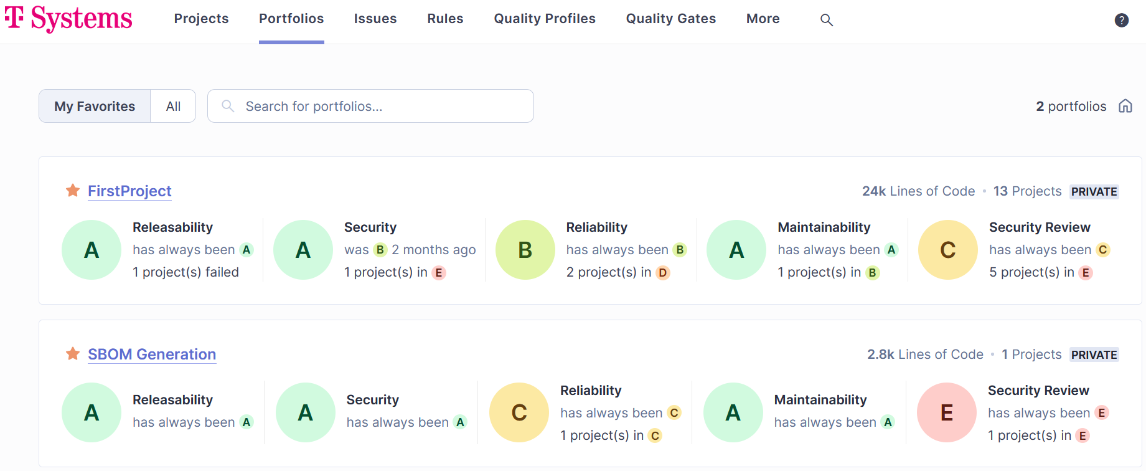
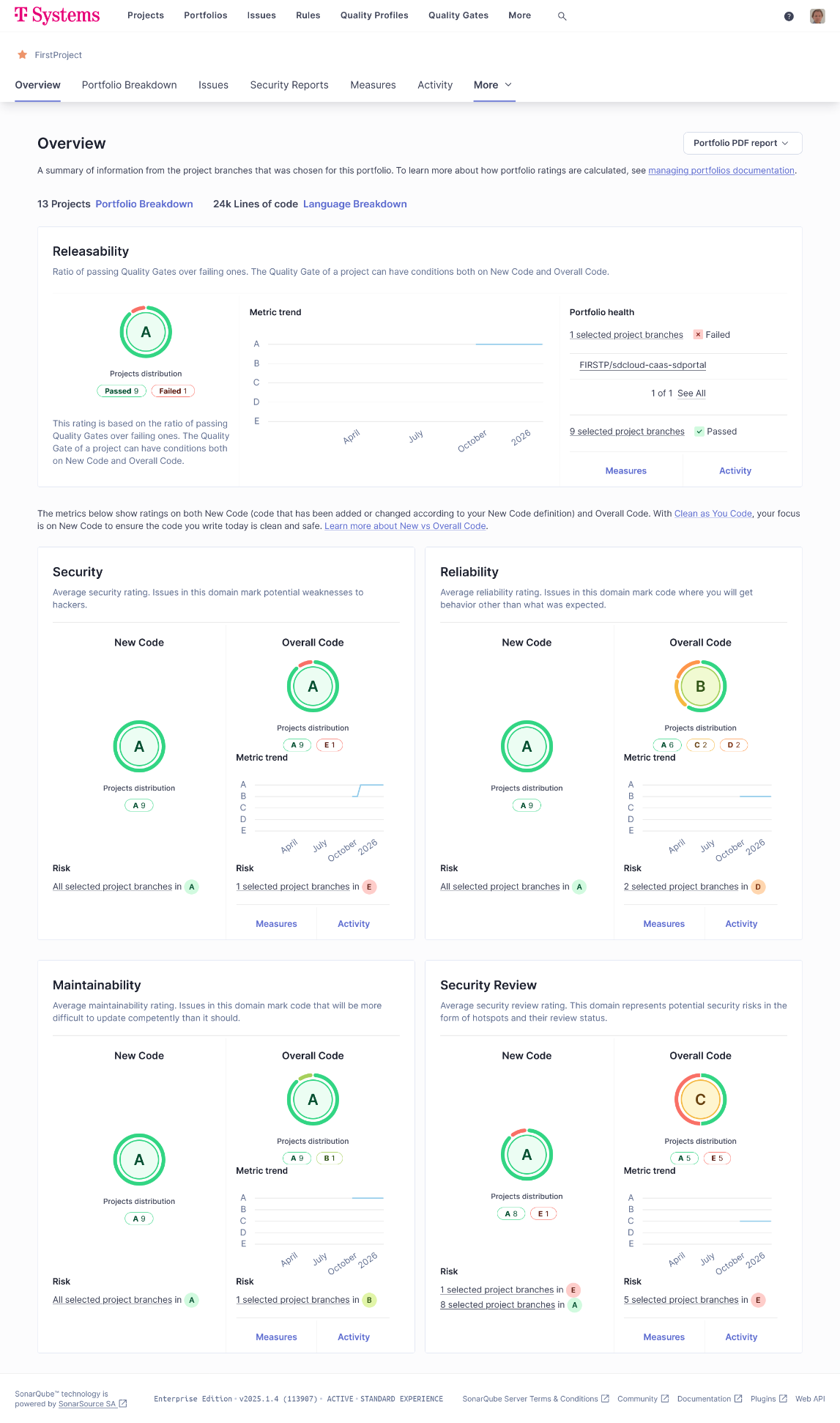
- If a SonarQube Enterprise license is detected, DevOps Portal will automatically set-up a Portfolio in SonarQube for each project, which aggregates the scan results of all git repositories in the project. You may need to rerun the build pipelines of your repositories to get the Portfolios populated with data. The following screenshot shows the Portfolios page in SonarQube with two examples:
You can click on any of the listed porfolios to get the full break down of included scan results for all git repositories which are part of the corresponding DevOps Portal project. See the next screenshot for an example:
- Since Bitbucket v9 and later allows to use HTTP Access Tokens with simple auth, it was now possible to replace the technical users in Bitbucket which were used by Jenkins to retrieve the git repositories by HTTP Access Tokens. This frees a Bitbucket license for each project which uses Bitbucket and Jenkins. See Create HTTP Access Token for project or repository access for more details.
Improvements
- Audit log messages now only list changes of global roles, but don't list unchanged roles. This gives a better overview about changes.
- The accessibility and usability of the pages for login and password change have been improved.
- The accessibility and usability of tables has been improved. This includes a switch to the most recommended sorting indicator icons.
- Stream lined status messages shown when using the Terms & Conditions management page.
- Localized some date formats in automatically sent emails.
Bugfixes
- Multiple invocations of role removals could lead to a negative member count being displayed for the affected project. It could be healed at any time by reloading the page, but now the counter will always correctly stop at 0.
- When a table is sorted on a column, it can happen that due to an action triggered by the user the sort order is violated since the value of the current row was changed. In this case, the sorting indicator is now reset. You can still at any time sort again by clicking on the column header.
Security
- When a user was locked in the Portal, it was still possible to use personal access tokens of that user in Jira, if any were created. This is now prevented by setting the user to deactivated in Jira. This was just a minor issue, since all project roles are removed from a user when it's locked. That means the tokens could only be used for user-specific API calls, not for project-specific calls. To allow the deactivation in Jira to work, project lead assignments of the user are removed. When the user is unlocked, its reactivated in Jira, therefore the tokens are working again. The drawback is, that project lead assignments cannot be restored. Project lead is a special role in a Jira project usually only relevant for notifications. It's not the same like a Project Admin role.
- When a technical user in Jenkins was deleted in the DevOps Portal, its personal access tokens in Jenkins were still working, if any were created. This has been solved now. This was just a minor issue, since all project roles are removed from a user when it's locked. That means the tokens could only be used for user-specific API calls, not for project-specific calls.
Dec 19 2025
Dec 19, 2025,
DevOps Portal 2.1.9
This bugfix release was only rolled out to customers of the Competitive Toolchain.
Bugfixes
- A change introduced in the last version made gitea links in the dashboard tiles "Issue Tracking" and "Source Code Managment" unclickable.
Dec 18 2025
Dec 18, 2025,
DevOps Portal 2.1.8
Improvements
- Previously, users without a SonarQube license could log into the tool, but did not see any data, since they were granted no roles in the tool. This has been now further improved, so that users without SonarQube assigned will just get an error message, but cannot log into the tool
- A link to the Jenkins metrics was added to the dashboard. It's only visible for users which have a Grafana license assigned.
- When roles are changed or resynced, the success messages now give more valuable information about what was done.
- On the Terms and Conditions page, the action buttons were replaced by a "More" menu, like on the other pages.
Bugfixes
- Due to some changes in the duplicate check when renaming a project, changing just some letters from lower to uppercase or from uppercase to lowercase was rejected. Works now again.
- Fixed error 500 when connecting Bitbucket git repositories with SonarQube projects in delivery pipelines.