

Dependency Track
Introduction
Dependency-Track is an open-source software composition analysis (SCA) tool. It creates and manages a software bill of materials (SBOM) for projects. The tool continuously checks dependencies for known vulnerabilities. It also tracks license compliance of open-source components. Teams gain visibility and control over their software supply chain. Helps integrate security into DevOps/CI-CD pipelines efficiently.
There are several useful resources available to get started with Deptrack:
Dependency-Track Documentation
Accessing Dependency-Track
Preconditions in DevOps portal to access Dependency-Track
- A Dependency-Track license must be assigned to the user
- Dependency-Track must be added to the tool list of the project
After completing the preconditions, a project in Dependency-Track, which is part of the DevOps-as-a-Service toolchain, can be accessed via the DevOps Portal or directly through a URL.
Via DevOps Portal
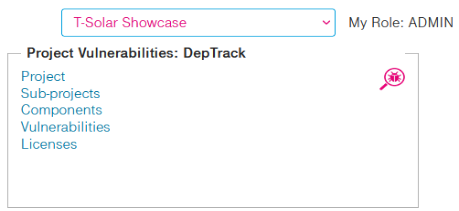
Go to the DevOps Portal Homepage and click on the link Project in the Project Vulnerabilities tile:
Via Direct URL
You can also access Dependency-Track directly using the following link format:
https://deptrack-<customer>.devops.t-systems.net/projects where <customer> is the id of your DevOps-as-a-Service instance.
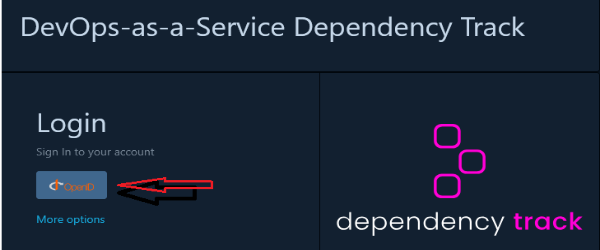
If you are not already logged in to another tool in the toolchain or the DevOps portal, then you have to login using your configured SSO credentials.
Dependency-Track Jenkins Interaction
Nur sdcPipeline() wird unterstützt, nur maven (bisher), alles automatisch
Users, Projects and Roles
- Projects, users and their roles in projects are managed in the DevOps Portal, the corresponding functions in Dependency-Track are disabled (UI and API)
⚠ Note
Projects in the DevOps portal are mapped to the corresponding subwikis in Dependency-Track.
- When Dependency-Track is added as a tool to an existing or new project, a corresponding subwiki is automatically created. Users assigned to the project in the DevOps Portal are then added to the subwiki with the roles defined in the configuration :
- Role mapping:
Project Role in DevOps Portal Permissions in XWiki Admin POLICY_VIOLATION_ANALYSIS,''VIEW_POLICY_VIOLATION,''VIEW_PORTFOLIO,'VIEW_VULNERABILITY,''VULNERABILITY_ANALYSIS' Master Can view, comment, and edit pages, but cannot delete content Developer Similar to Master Viewer Read-only access. Can only view content, no edits or comments allowed A detailed description of the XWiki role model can be found here
- Role mapping:
Main Features
Inside DevOps-as-a-Service, deptrack is mainly used for writing specifications and documentations. See below for a list of the main features of XWiki.
Collaborative Content Editing
- WYSIWYG and wiki syntax editors
- Version control and history tracking
- Inline and structured content editing
- Commenting and annotations
Advanced Page & Document Management
- Hierarchical page structure (nested pages)
- Templates for creating structured documents
- Tags, categories, and metadata support
- File attachments and preview
Powerful Search and Navigation
- Full-text search (Solr-based)
- Faceted search filters
- Page index, breadcrumbs, and navigation panels
Macros and Widgets
- Built-in and custom macros (charts, galleries, diagrams)
- Embedding of rich media (videos, iframes, etc.)
- Markdown and LaTeX support