

Dependency Track
STILL UNDER CONSTRUCTION
Introduction
Dependency-Track is an open-source Software Composition Analysis (SCA) tool that helps organizations manage and secure their software supply chain. It automatically generates and maintains a Software Bill of Materials (SBOM) for projects, continuously monitoring dependencies for known vulnerabilities. In addition, it tracks license compliance of open-source components, giving teams greater visibility and control. By integrating seamlessly into DevOps and CI/CD pipelines, Dependency-Track makes it easier to embed security throughout the development lifecycle.
There are several useful resources available to get started with Deptrack:
Dependency-Track Documentation
Accessing Dependency-Track
Dependency-Track is integrated into the DevOps-as-a-Service toolchain, but for now it’s only offered in the Pilotkunden Preview. To get started, a few prerequisites need to be in place.
Preconditions in DevOps portal to access Dependency-Track
- A Dependency-Track license must be assigned to the user
- Dependency-Track must be added to the tool list of the project
After completing the preconditions, a project in Dependency-Track, which is part of the DevOps-as-a-Service toolchain, can be accessed via the DevOps Portal or directly through a URL.
Via DevOps Portal
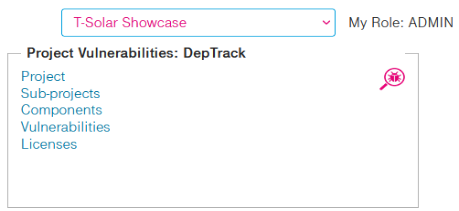
Go to the DevOps Portal Homepage and click on the link Project in the Project Vulnerabilities tile:
Via Direct URL
You can also access Dependency-Track directly using the following link format:
https://deptrack-<customer>.devops.t-systems.net/projects where <customer> is the id of your DevOps-as-a-Service instance.
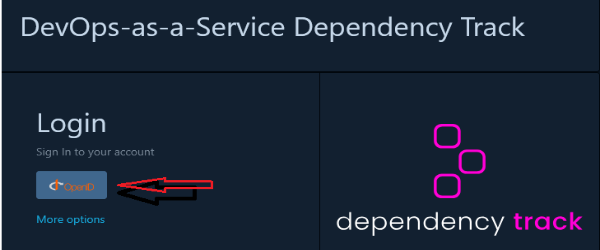
If you are not already logged in to another tool in the toolchain or the DevOps portal, then you have to login using your configured SSO credentials.
Projects
Dependency-Track Jenkins Integration
When using sdcPipeline(), Maven projects automatically generate a Software Bill of Materials (SBOM) and are pushed to Dependency-Track. This process is fully automated through the provided pipeline library. Currently, this option is only available for Maven projects.
Collection Project
In Dependency-Track, these Maven builds are organized under a Collection Project. Subprojects (for example, individual modules of a Maven project) are created as children of the collection. This makes it easier to see aggregated metrics, such as vulnerabilities and license compliance, without having to open each subproject individually.
For more details, see the Collection Projects section in the Dependency-Track documentation.
Users and Roles
- Projects, users and their roles in projects are managed in the DevOps Portal, the corresponding functions in Dependency-Track are disabled (UI and API)
⚠ Note
Projects in the DevOps portal are mapped to the corresponding subwikis in Dependency-Track.
- When Dependency-Track is added as a tool to an existing or new project, a corresponding subwiki is automatically created. Users assigned to the project in the DevOps Portal are then added to the subwiki with the roles defined in the configuration :
- Role mapping:
Project Role in DevOps Portal Permissions in XWiki Admin POLICY_VIOLATION_ANALYSIS,''VIEW_POLICY_VIOLATION,''VIEW_PORTFOLIO,'VIEW_VULNERABILITY,''VULNERABILITY_ANALYSIS' Master Can view, comment, and edit pages, but cannot delete content Developer Similar to Master Viewer Read-only access. Can only view content, no edits or comments allowed A detailed description of the XWiki role model can be found here
- Role mapping:
Main Features
Inside DevOps-as-a-Service, deptrack is mainly used for writing specifications and documentations. See below for a list of the main features of XWiki.
Collaborative Content Editing
- WYSIWYG and wiki syntax editors
- Version control and history tracking
- Inline and structured content editing
- Commenting and annotations
Advanced Page & Document Management
- Hierarchical page structure (nested pages)
- Templates for creating structured documents
- Tags, categories, and metadata support
- File attachments and preview
Powerful Search and Navigation
- Full-text search (Solr-based)
- Faceted search filters
- Page index, breadcrumbs, and navigation panels
Macros and Widgets
- Built-in and custom macros (charts, galleries, diagrams)
- Embedding of rich media (videos, iframes, etc.)
- Markdown and LaTeX support